Introducing the Editor
When I tell people justdraw.fyi has no account and nothing to install, the next thing they say is some polite version of: so it’s a toy.
It’s a fair inference. Almost everything that opens instantly in a browser tab with no sign-in is a toy, because the things that aren’t toys are the things somebody spent years on, and the people who spend years on something want to know who you are. So the absence of a login has become a reliable signal of the absence of depth.
I’d like to break that correlation, and the only honest way to do it is to describe the tool.
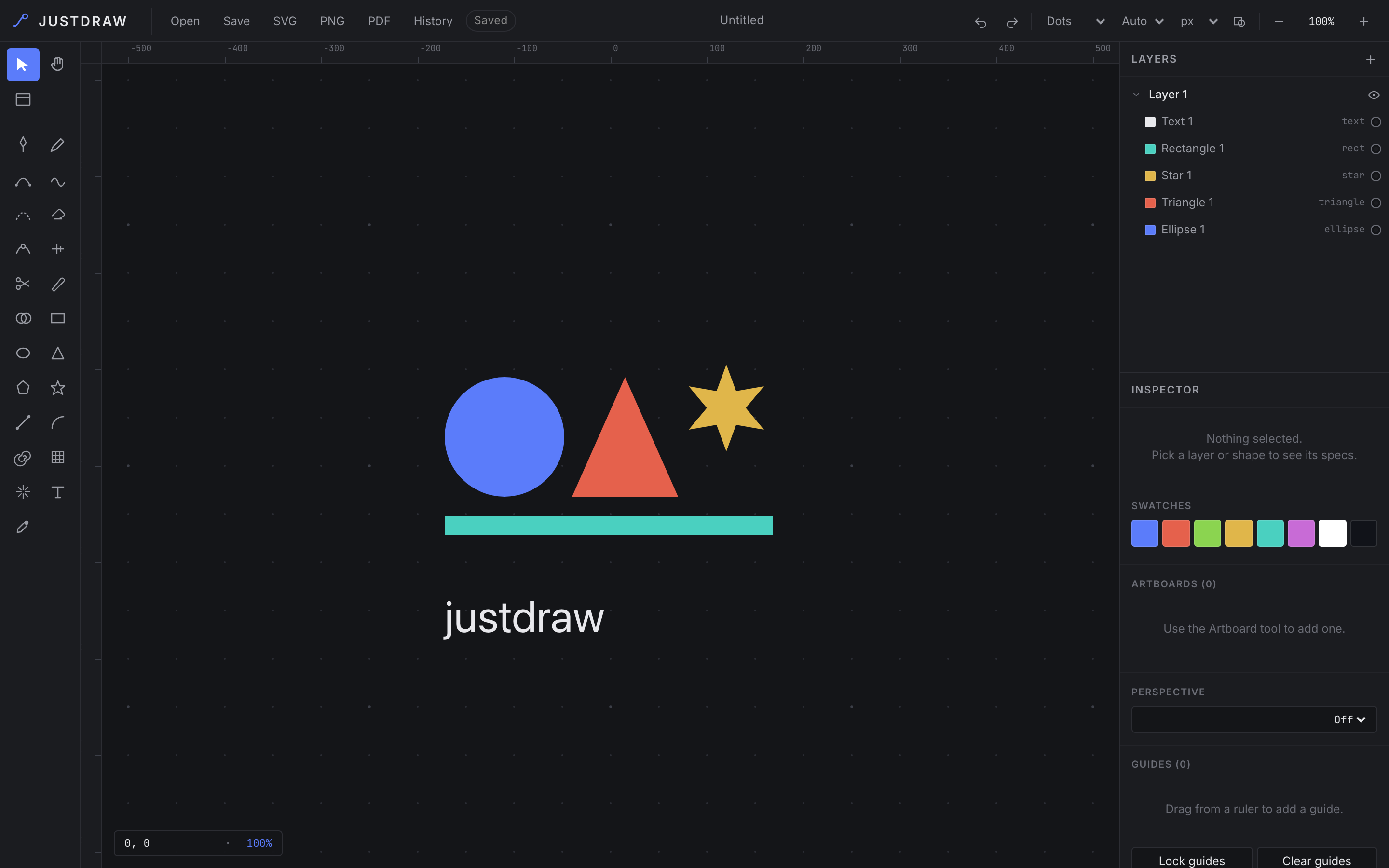
Start with the pen. Not a line tool — a bezier pen, with control handles you can break, so a curve can come into a point and leave it in a different direction. That is the primitive that separates vector drawing from shape-dragging, and it is the thing that is missing from every browser toy I have ever opened. Next to it is a pencil for freehand, a curvature tool that lets you place a smooth curve by clicking through the points you want it to pass, and a smooth tool you drag along a path you already drew to relax it.
Then the shapes, which are the boring part and are all present: rectangle, ellipse, triangle, polygon, star, line, arc, spiral, a rectangular or polar grid, and a starburst flare. Each is one keystroke away, because a tool you reach for fifty times an hour should cost one key and not a trip to a menu. [1]
Now the part I actually want to talk about, which is the tools that don’t create geometry but change it.
Scissors splits a path at a point you click. Knife slices across everything you drag it through. The path eraser trims along a path rather than deleting it. Reshape rubber-bands a region of a path — not a single anchor, a region — and moves the whole region as one, which is how you fix a curve that is wrong in the middle instead of wrong at a point. Width gives a stroke a variable weight, thick here, thin there, the way an actual ink line behaves when a hand presses into it.
And then there is Shape Builder, which is the reason I use this thing.
Draw two overlapping circles. Their overlap is a lens shape that does not exist as an object anywhere in the document; it’s an accident of two other objects sitting on top of each other. With Shape Builder you drag across that lens and it becomes real — one shape, on its own, with its own fill. Alt-drag across a face and it’s gone, subtracted out.
This sounds like a small thing. It changes how you draw. Without it, you draw a complicated silhouette by placing anchors along its outline, one by one, correctly, from imagination. With it, you draw three overlapping rectangles and a circle and then wipe away the parts you don’t want, the way you’d carve. The first method requires you to know the answer before you start. The second lets you find it. Almost nobody who has used a boolean shape builder goes back, and it is why “vector editor in a browser tab” and “toy” don’t have to be the same sentence. [2]
Around all of that sit the things that make a drawing a document rather than a picture: layers, groups, artboards that define export regions, a palette of swatches that belongs to the document, undo and redo, a grid you can size and restyle, display units, version history, and an outline view for when the fills are lying to you about what the geometry is really doing.
Two decisions in the editor are worth explaining, because they look like taste and they are not.
The canvas is infinite. A page is a printing constraint, and I am not printing. Shapes go where you put them, negative coordinates are fine, you pan and you keep going. If you want a page, you make an artboard, and the page becomes a thing you chose rather than a wall you were born inside.
And everything you draw starts the same flat grey — #202128, on a canvas that
is #141518. That is deliberate, and people find it strange for about a minute.
A new shape is not a decision about colour. A tool that picks a colour for you is
a tool you now have to argue with, and the argument costs more than the choice.
So the geometry arrives uncoloured, and the swatches are sitting right there for
the moment you actually mean something by red.
The dark canvas is the same principle pointed at the interface. The artwork should be the brightest thing on the screen; every panel around it is a grey chosen to sit behind your drawing rather than compete with it. Look at any tool people use for eight hours a day and you will find someone made that decision too. The interface is supposed to recede.
One last thing, and it’s the reason any of this loads before you lose interest.
The editor is plain ES modules. The browser fetches main.js and that is the
entire story: no bundler, no framework, no build step, no hydration, no
multi-megabyte payload spinning up your fans before the first rectangle appears.
That isn’t asceticism. It’s the same principle as the missing login, applied one
layer down. Everything you put between the click and the canvas is something that
can be slow, can break, and can fail on somebody’s corporate network in a way you
will never reproduce.
The document autosaves while you work, and you can pull it out whenever you like: the Save button hands you the drawing as YAML you can read with your own eyes, and SVG, PNG and PDF do what they say.
That’s the tool. It’s the same tool a command line drives, and the same tool an AI agent drives, which are the next two posts. But it had to be good on its own first. A protocol on top of a weak editor is just a faster way to make a weak drawing.
[1] V for select, H for hand, P pen, B pencil, R rectangle, O ellipse, T triangle, Y polygon, S star, L line, M shape builder, G toggles the grid.
[2] It is also the tool that most reliably makes someone say “oh” out loud the first time they use it, which is a metric I have come to trust more than most of the ones you can put in a spreadsheet.